Signalgrid Activity API
Updated on March 31, 2026
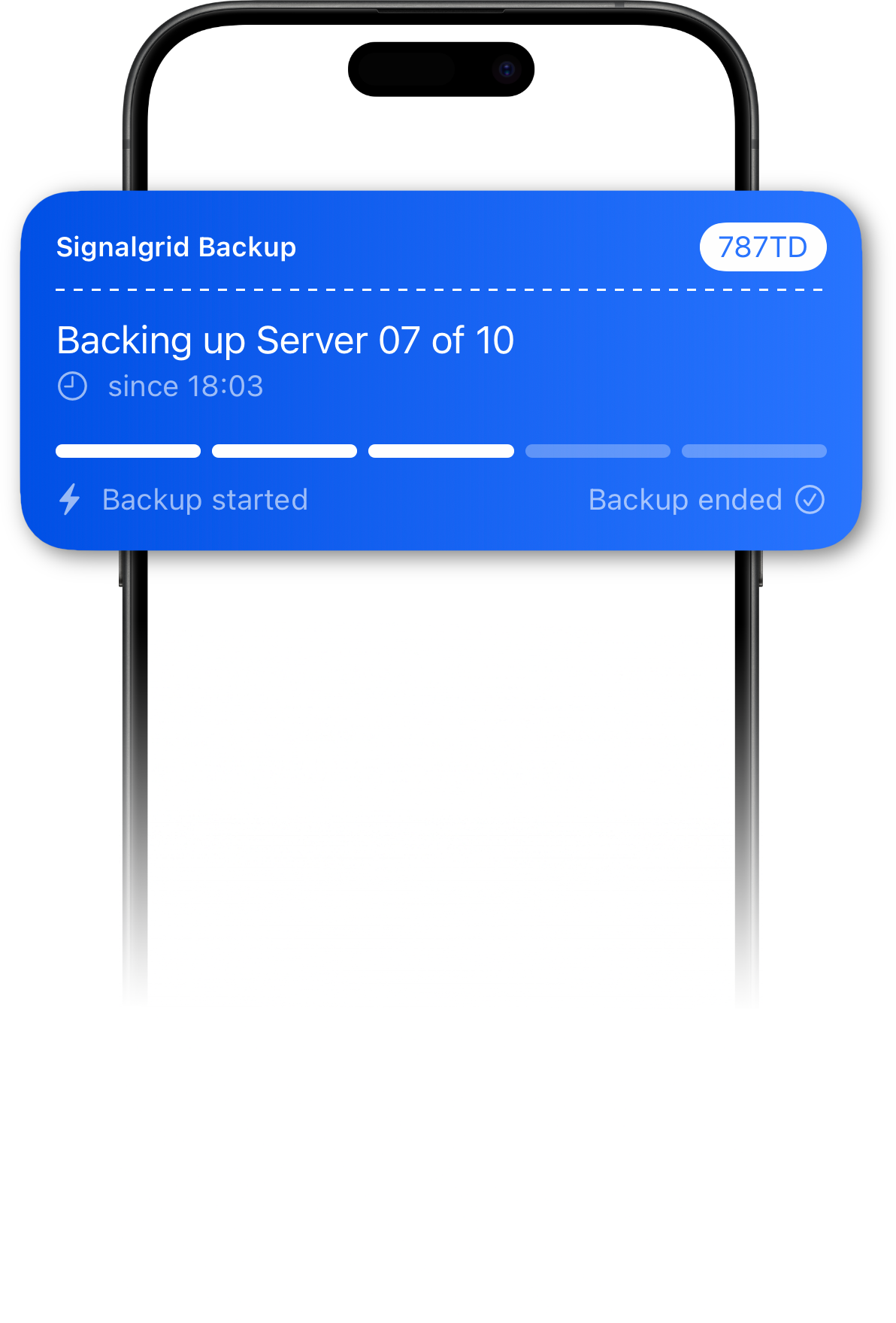
Signalgrid Live Activities allow you to display ongoing progress updates directly on user devices. Instead of sending multiple separate notifications, an activity can be updated continuously while a process runs.
On supported devices, Activities appear as Live-Activity on iOs and as Ongoing Notification on Android.
This makes activities ideal for tracking long-running tasks such as deployments, CI/CD pipelines, imports, backups, or automation workflows.
POST https://api.signalgrid.co/v1/activityTo start an activity, send a request containing the initial activity data.
curl -X POST https://api.signalgrid.co/v1/activity \
    -d "client_key=YOUR_CLIENT_KEY" \
    -d "channel=CHANNEL_TOKEN" \
    -d "type=start" \
    -d "title=Signalgrid Backup" \
    -d "body=Backup is starting..." \
    -d "severity=info" \
    -d "progress=0" \
    -d "steps=1" \
    -d "progress_legend=true" \
    -d "start_text=Backup started" \
    -d "end_text=Backup ended"
The API will return a response containing an activity token that is used for all future updates of the activity.
{
    "ruuid":"8b2c71d93a6e4c3d91c2fbe5f0a13c74e62d1f55",
    "text":"OK",
    "code":"200",
    "node":"dp02",
    "time":"301ms",
    "remaining":"9672",
    "activity_update_token":"CDGZ9"
}
Activities can be updated multiple times while the process runs. The activity_update_token
identifies the activity that should be updated.
curl -X POST https://api.signalgrid.co/v1/activity \
    -d "client_key=YOUR_CLIENT_KEY" \
    -d "channel=CHANNEL_TOKEN" \
    -d "type=update" \
    -d "token=ACTIVITY_UPDATE_TOKEN" \
    -d "title=Signalgrid Backup" \
    -d "body=Backing up server 01 of 10" \
    -d "progress=10" \
    -d "steps=1" \
    -d "progress_legend=true" \
    -d "start_text=Backup started" \
    -d "end_text=Backup ended"
Sending updates close to each other sometimes causes Apple and Android to ignore the Activity-Update.
Make sure you are sending them with enough time between each other so that does not happen.
Using a sleep 5 before every update-message should be enough.
When the process completes, update the activity with a final progress value.
curl -X POST https://api.signalgrid.co/v1/activity \
    -d "client_key=YOUR_CLIENT_KEY" \
    -d "channel=CHANNEL_TOKEN" \
    -d "token=ACTIVITY_TOKEN" \
    -d "title=Signalgrid Backup" \
    -d "body=10 of 10 Backups finished." \
    -d "progress=100" \
    -d "steps=1" \
    -d "progress_legend=true" \
    -d "start_text=Backup started" \
    -d "end_text=Backup ended" \
    -d "dismissal_delay=60"
If progress_legend=true is enabled, both start_text and
end_text must be provided. Otherwise the fields will display empty text.
client_keychanneltokentypestart, update, end)severityprogressstepsprogress_legendstart_textprogress_legend=true.end_textprogress_legend=true.dismissal_delayLive Activities and ongoing notifications are subject to platform limits imposed by Apple and Android. Signalgrid does not control these limits. Both operating systems enforce internal budgets that restrict how often activities can be created or updated. These limits exist to protect battery life and system resources. If activities are started too frequently, Apple may temporarily prevent new Live Activities from being created. Unfortunately Apple does not publish the exact limits or budgets used to enforce these restrictions. For this reason, Live Activities should be used for long-running processes such as deployments, pipelines, imports, or backups. They are not intended to be triggered repeatedly for short or frequent events. To ensure reliable delivery, avoid starting large numbers of activities within a short period of time and update existing activities instead of creating new ones whenever possible.
Any environment capable of making HTTP requests can start, update, and finish Signalgrid activities.